
One reason you might need to set aside funded reserves is to pay for capital improvements in a future year. For example, suppose you plan to do some rehab work that will cost $30,000 in year 1, and $20,000 in year 2. You want the total of $50,000 to be part of your initial investment.
You would enter the $30,000 as Capital Improvements from Initial Investment in cell D88 of the “Cash Flow & Resale Assumptions” worksheet.
You would then enter the year 2 amount of $20,000 in 3 places:
- in cell D91, as Funded Reserves from Initial Investment,
- in cell E95, to apply these reserves in year 2, and
- in cell E89, to show the actual year 2 capital improvements.
Also, check the “Apply reserves (if available) as follows” checkbox in row 95. When you are done, the “Capital Improvements & Funded Reserves” section will look something like this:
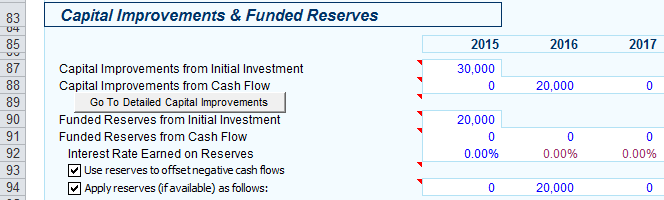
Note – the row numbers for these entries changed over time – if you are using an earlier version or build of REIA Pro, then your row numbers may be different.